How to Choose the Best Internet Router for Your Home?
Choosing the best Internet Router for your home can be daunting. With various models available, each boasting unique features, decisions can become overwhelming. An effective Internet Router is crucial for ensuring reliable connectivity for your devices. It impacts your streaming quality, video calls, and even online gaming experiences.
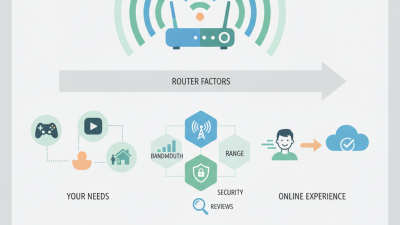
Start by considering your household's internet usage. Are multiple users streaming videos or gaming simultaneously? Assessing how you use the internet can help determine the specifications you need. Moreover, bandwidth and coverage area are key. Selecting a router that meets your space's requirements can significantly enhance your connection.
It's also essential to think about security features in today's digital landscape. Many routers now offer advanced encryption and security protocols. This helps protect your personal data. A good Internet Router not only connects devices but also safeguards your online presence. Emphasizing these factors will guide you to make a more informed choice.
Understanding Your Home Internet Needs
When choosing the best internet router for your home, it’s essential to understand your specific needs. Begin by assessing your internet usage. A report from the Pew Research Center states that 77% of American adults regularly engage in online activities like streaming, gaming, or video conferencing. If your household includes multiple users streaming in high definition simultaneously, your bandwidth needs will increase significantly.
Consider the size of your home as well. According to a study by the International Telecommunication Union, larger homes often struggle with Wi-Fi coverage. A router's range may not be sufficient for extensive layouts. In such cases, mesh networks could be a viable solution. These systems consist of multiple units that work together to ensure a stable connection throughout your space. However, they require thoughtful placement to maximize effectiveness.
Additionally, think about the number of devices connected to your network. The average household has around 11 connected devices, as per a report by Statista. Some devices may not require high speeds, while others, like gaming consoles and smart TVs, do. Balancing speed and connectivity across varied devices remains a challenge for many homeowners. Reflecting on these factors can lead to better long-term decisions.
Types of Routers: Which One is Right for You?
Choosing the right router for your home starts with understanding the different types available. There are three primary types: traditional, mesh, and gaming routers. Each serves distinct needs. Traditional routers are often cheaper and work well for small spaces. However, they may struggle with multiple devices.
Mesh routers offer a solution for larger homes. They consist of multiple nodes, providing better coverage. According to a report by the Wireless Broadband Alliance, nearly 30% of users experience dead zones in their homes. A mesh system can significantly reduce these issues. It seamlessly connects devices as you move around.
Gaming routers are optimized for speed and performance, especially for gamers. They often feature quality of service (QoS) settings, prioritizing gaming traffic. Research indicates that 70% of gamers prefer low-latency connections for a better experience. However, they can be more expensive. Consider your specific needs and the layout of your home when choosing the best router.
Key Features to Consider When Selecting a Router
When selecting the best router for your home, consider several key features. Speed is crucial. Look for routers that support the latest Wi-Fi standards. Dual-band options can help reduce congestion. A good router offers different frequency bands. This can significantly improve performance in busy households.
Next, assess the coverage area. Ensure the router can reach every corner of your home. Walls and furniture can create dead zones. Sometimes, a larger home needs a mesh Wi-Fi system. It can provide seamless coverage throughout large spaces. We often underestimate how location impacts signal strength. Placing the router in a central spot is essential.
Security features should not be overlooked. Choose a router with advanced encryption options. Regular firmware updates keep your network secure. Guest network capabilities can safeguard your devices. It's vital to balance convenience and safety. Investing in strong security measures pays off in the long run.
Average Internet Speed by Router Type
Tips for Optimizing Your Router's Performance
Choosing the right router is crucial. It's not only about speed. Optimizing your router can significantly enhance your internet experience. Here are some practical tips.
Positioning your router correctly matters. Place it in a central location. Avoid corners or enclosed spaces. Walls and furniture can block signals. Elevation is important too. Higher placement can improve coverage.
Update your router’s firmware regularly. Manufacturers often release updates that fix bugs. These updates can enhance security and performance. Finally, consider adjusting the channel settings. Other networks may interfere with your signal. Finding a less crowded channel can boost your speed.
These optimization tips can help. Many users overlook these details. With a little effort, performance improves. It's worth experimenting to find what works best for your home.
How to Choose the Best Internet Router for Your Home? - Tips for Optimizing Your Router's Performance
| Feature |
Recommendation |
Importance |
| Wireless Standard |
Wi-Fi 6 (802.11ax) |
High |
| Coverage Area |
Up to 3000 sq ft |
Medium |
| Number of Bands |
Dual-band |
High |
| Ethernet Ports |
4 Ports |
Medium |
| USB Ports |
1 x USB 3.0 |
Low |
| Security Features |
WPA3 Encryption |
High |
| Price Range |
$100 - $300 |
Medium |
Setting Up and Securing Your New Router
Setting up your new router is crucial for enhancing your home network. A 2022 report from the Pew Research Center shows that 93% of American adults use the internet daily. Ensuring that your router is secure helps protect your personal information. An essential first step is to change the default administrator password. Default passwords are often easy targets for hackers. Use a mix of letters, numbers, and symbols.
Next, enable WPA3 encryption if available. According to a study by Cybersecurity Ventures, cybercrime damages are expected to total $10.5 trillion annually by 2025. Strong encryption reduces the risk of unauthorized access. Regularly updating your router's firmware also helps patch security vulnerabilities. Yet, many users neglect this crucial step. A 2021 survey indicated that less than 30% of home internet users routinely update their devices.
Consider setting up a guest network for visitors. This keeps your primary network safer by isolating connected devices. Additionally, make use of parental controls if children use the network. It allows monitoring of online activity, but it may not catch everything. Some might feel uneasy about privacy implications. Ultimately, it's about balancing convenience and security in your home environment.